“Next to them again?”: how to stop repeat seat partners when you change seats
Published
“I'm next to them again?” It's a complaint teachers hear every time the seats change. Even with random draws, the same pairs come up more often than you'd expect, especially in small classes or with table groups. This guide shows how to use your previous seating charts to keep repeat seat partners to a minimum.
Why the same neighbors keep coming back
Whether you draw names or rotate by a fixed pattern, repeat neighbors will keep happening unless you check the previous chart. They’re especially likely when:
- The class is small
- Students sit in table groups (pods) of four or more. Sharing a table is the same as sitting together
- Some students can only sit in certain seats, for example near the front
- The rotation is simple, so the order of who sits next to whom barely changes
Three things to decide first
1. How far back to look
Avoiding only the last chart is different from avoiding the last two or three.
- Last chart only: easy to avoid, but the pair from two charts ago can come straight back
- About the last three: a good starting point for most classes
- Too many: so many pairs are ruled out that it clashes with the seating needs you have to meet
The smaller the class, the fewer charts you should look back through.
2. What counts as “next to”
- Rows: only left and right, or front and back as well?
- Table groups: it’s natural to treat everyone at the same table as neighbors
3. Hard rule or “if possible”?
Pairs that must be kept apart for a reason have to be a hard rule. But avoiding repeat neighbors is almost always fine as “if possible”. Make it a hard rule and, depending on class size and your other needs, you may end up with no chart that works.
Doing it on paper
- Keep every seating chart, with the date written on it
- Before the next change, list the pairs who sat together on the last chart (and the one before)
- Draw or rotate a draft chart, then check it against your list
- Swap anyone who ended up next to a listed partner, without breaking your other seating needs
The further back you look, the longer steps 3 and 4 take.
Letting an app avoid them for you
The seating chart app SeatCraft has “avoid recent neighbors” built in.
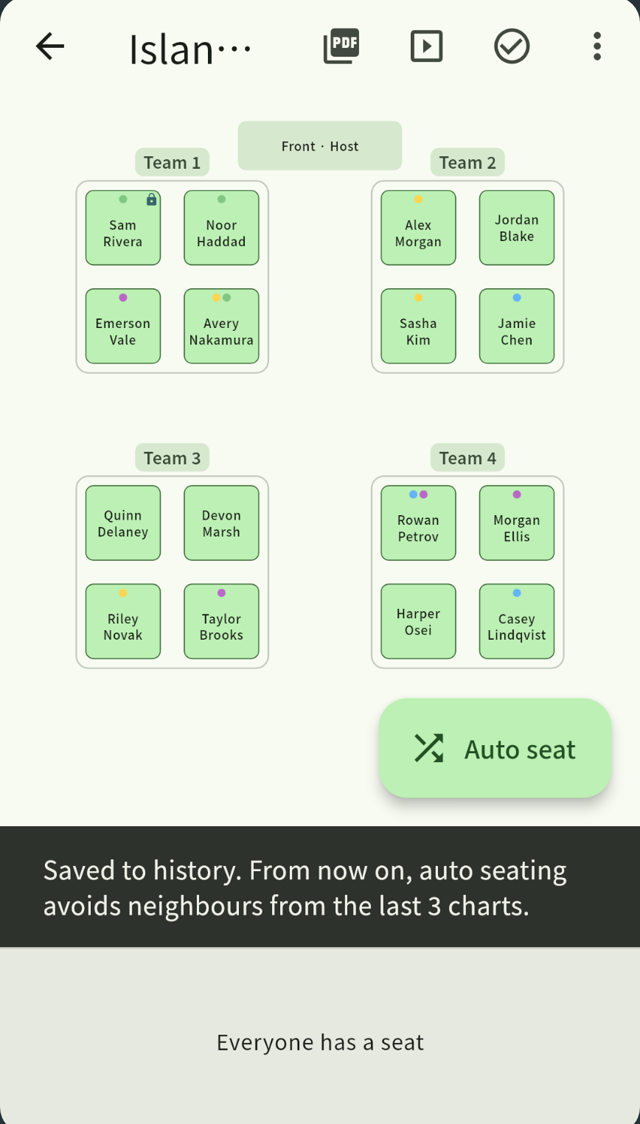
- When you confirm a seating chart, it’s saved to the history
- Every chart after that keeps recent neighbors apart where it can
- Choose how far back to look, from 0 to 10 charts. The default is three
- Generate as many drafts as you like. Only confirmed charts go into the history
- What counts as a neighbor depends on the layout: everyone at the same table for table groups, the seats in front, behind and to the side for rows
It works together with pairs kept apart (two students who must never sit together) and pinned areas (a student who needs to sit near the front). Pairs kept apart are an absolute rule, and recent neighbors are an “if possible” rule, so you get fresh combinations without breaking the arrangements students rely on.
Rosters and history stay on your device. Every feature is free for up to 20 people.
Summary
- Keep your previous charts and repeat neighbors drop sharply
- Look back about three charts, and fewer for small classes
- Make “avoid recent neighbors” an “if possible” rule, not an absolute one
Related guides
Seating charts that follow your rules, in seconds.
SeatCraft is a seating chart app for iPhone, iPad and Android. Every feature is free for up to 20 people, with no account needed. Larger groups need the full version, a one-time purchase with no subscription.